Icon localization
SonicDE applications support right-to-left (RTL) languages such as Arabic and Hebrew. Icons should be localized as needed in order to preserve meaning across locales.
Icons representing forward motion
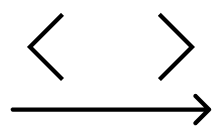
In LTR, time progresses left to right. The forward button is on the right.
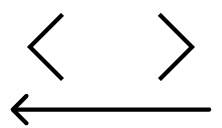
In RTL, time progresses right to left. The forward button is on the left.
Navigational icons are the most important icons in your interface when localizing, as they communicate the basic structure of your user interface. If an arrow is pointing in the same direction that people read, people usually interpret it as “forwards.” If it points the opposite direction, people usually interpret it as “backwards.”
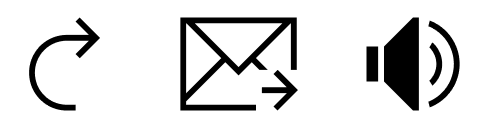
In LTR, forwards motion goes from left to right.
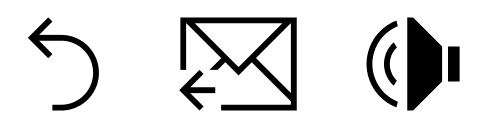
In RTL, forwards motion goes from right to left.
This sense of directionality also extends to icons depicting motion. For example, in LTR, sound waves come from the left and move forwards to the right. To localize a sound wave icon to RTL, depict sound waves coming from the right and moving forwards to the left.
Skeuomorphism

Media playback icons do not change between LTR and RTL.
Icons depicting real-world objects that do not change across cultures should not be mirrored, even if they normally would.
The most notable example of this are media playback icons, which depict the icons found on buttons of real-world objects that are not mirrored in RTL-writing countries.
Media playback icons (and progress bars) should be represented in the same direction in LTR and RTL.
Icon handedness
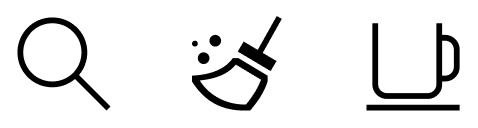
Do: Keep icons depicting right-handedness in their original direction.
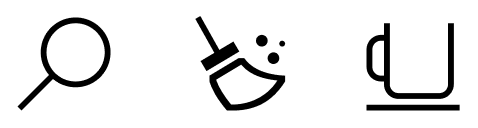
Don't: Do not mirror right-handed icons in RTL.
Just as the majority of people in LTR-writing countries are right-handed, the majority of people in RTL-writing countries are also right-handed. Icons depicting objects such as magnifying glasses and coffee mugs have their handles on the right due to the majority of people holding them with their right hands, not due to a sense of forwards motion.
Leave icons depicting handedness unmirrored when localizing them.
Circular time

Time goes forwards clockwise and backwards counterclockwise in both LTR and RTL.
Even though people understand the linear direction of time differently between LTR and RTL, people understand the circular progression of time the same in both LTR and RTL. Clocks always turn clockwise to represent the forward progression of time.
Icons representing writing
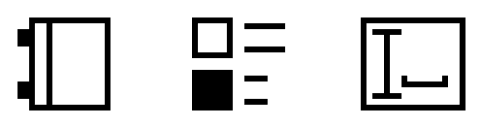
Left-to-right variants of icons that indicate writing.
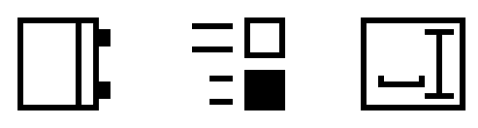
Right-to-left variants of icons that indicate writing.
In right-to-left languages, the start of the page is at the right, not the left. People typically hold books with the spine at the right of the page, not the left of the page. Depictions of text and writing in localized icons should reflect this, starting and being aligned at the right instead of the left.

Latin writing icons.

Arabic writing icons.

Hebrew writing icons.
Sometimes icons may include letters or letter-like forms to communicate a script-related concept, such as spell checking, alphabetical sorting, or a document. Consider localizing these icons into their respective writing systems.
If your icon represents a concept unrelated to writing, consider designing one that doesn't use text.
Composite icons

LTR icons with tools or slashes overlaid.

RTL icons with tools or slashes overlaid.
If your icon has a component overlaid on the main object such as a slash to indicate a disabled state, a tool overlaid on top of the object, or an emblem indicating an action, attempt to mirror the main object and leave the overlay in the same orientation.
Do: Preserve the orientation of overlays while redrawing the base object to be RTL.

Don't: Avoid mirroring both the entire icon and its overlays.
These overlays may be applied to icons which do not get mirrored in RTL. It is important to keep overlays in the same position between mirrored and non-mirrored icons for visual consistency.