Sending clips to a pastebin
Dion Moult wrote this tip in a blog post on 26 November 2011.
Pastebins are a really useful way to share snippets of text. However, it's sometimes a bit cumbersome to open a browser window, type in the URL, paste the text, click submit, then copy the URL to share with your friend. That's why tools like wgetpaste exist: small command-line utilities that automate this and return the URL. wgetpaste isn't part of SonicDE, so install it first, or use a similar tool.
The Clipboard adds whatever you copy, through the right-click Copy or Ctrl+C, to its history. It lets you paste something you copied a while back, set up custom items to paste, or automatically perform an action on what you copied. The most common use is to open a link in a browser when you copy one.
Here, we'll get the Clipboard to post our item to a pastebin and return the URL to us. Set it up on the Actions Configuration page as shown below:
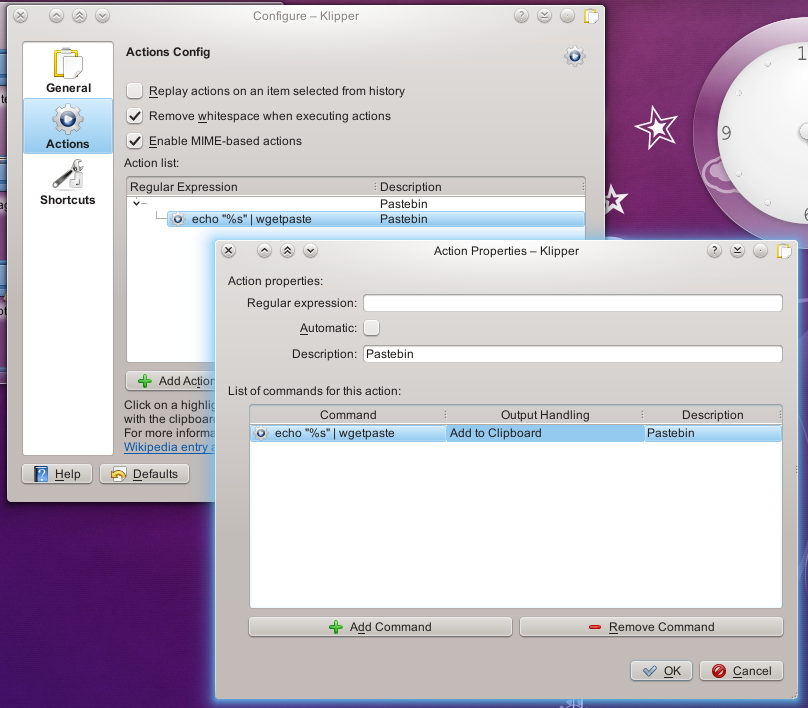
Then give Manually Invoke Action on Current Clipboard a key on the Shortcuts page, since it has none by default. Ctrl+Alt+R is a good choice.
And you're done! Copy something, press that shortcut to open the actions menu and click Pastebin. The URL of the pasted item is now in your clipboard, ready to paste to your friend with Ctrl+V.