Using the Compose key
The Compose key lets you type characters that usually aren't on your keyboard's keys, such as an umlaut, a macron or accents on letters.
This works with almost all applications, including the desktop, browsers and LibreOffice, as well as many console applications.
These instructions set up a Compose key on the right logo key, which on most keyboards shows the Windows logo.
Setting it up
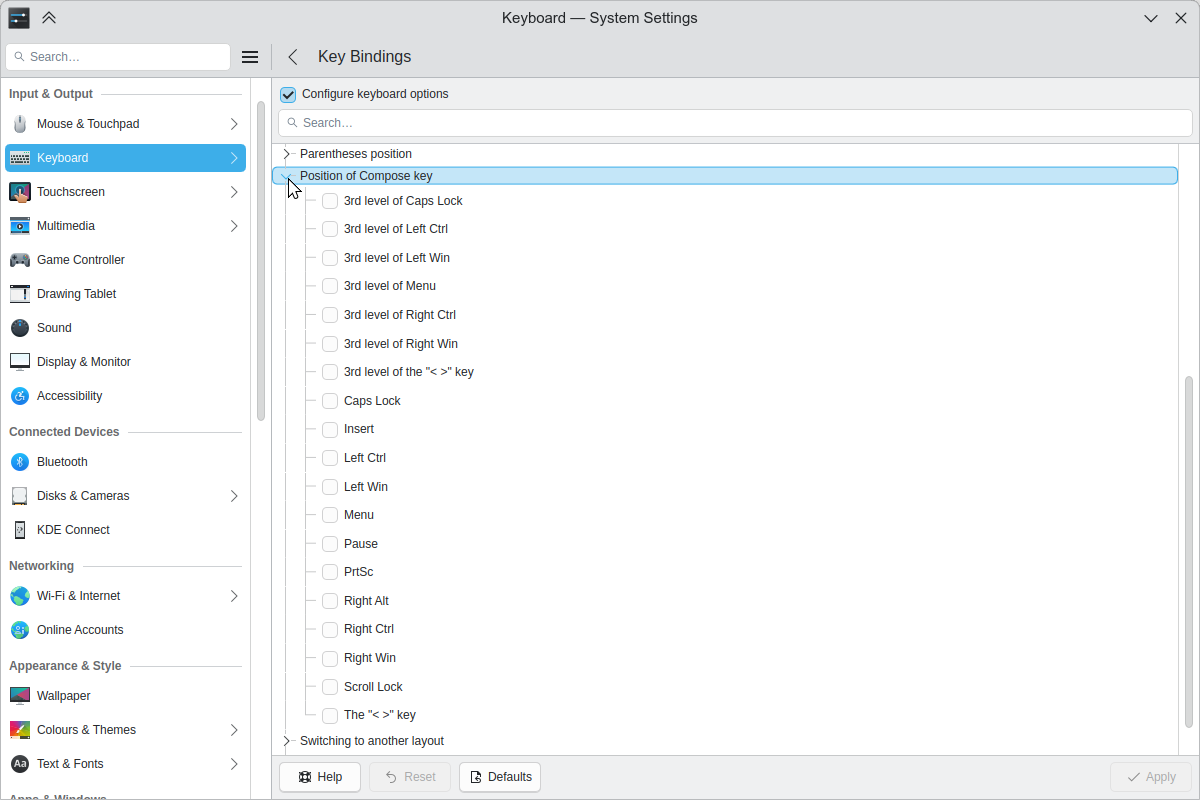
- Open the Keyboard module in System Settings.
- Go to Key Bindings.
- Tick Configure keyboard options.
- Expand Position of Compose key.
- Tick the key you want to use.
Console configuration
On Debian-based systems, you can reconfigure the console for your keyboard and character encoding, in a text terminal:
sudo dpkg-reconfigure console-setup
Follow the steps:
- Choose your keyboard.
- If you want an AltGr replacement, choose one.
- Choose the key for your Compose key.
- Set the console's encoding to UTF-8.
- Choose the character sets that should be available on the console.
- Choose the type of console output you'd like. The current defaults are safe.
A new initial RAM disk is then created for the next boot.
GTK applications
If Compose doesn't work out of the box in GTK applications, they may be using a different input method. To make one application use the X input method, set the GTK_IM_MODULE environment variable when you start it:
GTK_IM_MODULE=xim firefox
To set it for a whole shell session:
export GTK_IM_MODULE=xim
To keep this for your whole desktop session, see Session environment variables.
If you have run_im ibus in .xinputrc, delete that line, then restart.
Adding your own sequences
You can add more characters, or put characters in more convenient places. Create a ~/.XCompose file with lines like these:
# ~/.XCompose
# This file defines custom Compose sequences for Unicode characters

# Import default rules from the system Compose file:
include "/usr/share/X11/locale/en_US.UTF-8/Compose"

# To put some stuff onto compose key strokes:
<Multi_key> <minus> <greater> : "→" U2192 # Compose - >
<Multi_key> <colon> <parenright> : "☺" U263A   # Compose : )
<Multi_key> <h> <n> <k> : "hugs and kisses" # Compose h n k
Log out and in again, and you can use your new sequences. As you can see, this even works for longer strings of text.
Typing macrons, umlauts and accents
The Compose key is now whatever you've set it to be, such as the right logo key.
- Macrons: Press Compose, then Shift+hyphen (underscore), then a vowel: āēīōū ĀĒĪŌŪ
- Umlauts: Press Compose, then Shift+single quote (double quotes), then a vowel: äëïöü ÄËÏÖÜ
- The German Eszett: Press Compose, then
stwice: ß
You'll find more sequences in /usr/share/X11/locale/en_US.UTF-8/Compose.